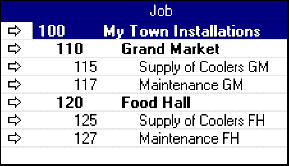
Be careful when numbering new jobs. In the Jobs List window, jobs appear in alphanumeric order. For example, the following job numbers:
5
055
06
005
05A
0A5
will appear in the Jobs List window in this order:
005
055
05A
06
0A5
5
Job numbers and job levels work together to create a hierarchy for your jobs. This enables you to create complex job structures that provide subtotal information about various aspects of each job.
If you track only a few simple jobs, your Jobs List may include nothing more than a handful of detail jobs at the top level, Level 1. For many AccountEdge users, though, Level 1 will contain only header jobs; these header jobs may have simple or complex combinations of header and detail jobs beneath them.
When you add a new job to the Jobs List, it is assigned to the next job above it that has a higher job level than the new job. For example, a new Level 4 detail account might be assigned to a Level 3 header account, which may be assigned to a Level 1 or 2 header account.
In the example above, job 100 is the Level 1 job which summarizes all the header and detail jobs beneath it. Both job 110 and job 120 are header jobs, and each includes two detail jobs. Notice that the header jobs are shown in bold.
Although a job level is selected for each new job automatically, you can change the job's level in the Jobs List window. (Changing job levels)
Step by step