In MYOB AccountEdge, a record is a collection of information about individual parts of accounting data. For example, information about a single sale or purchase is stored as a record.
When importing sales, purchases and journal entries, a blank line must be entered between each record, that is, there must be a line between each sale, purchase or journal entry. A blank line indicates the end of the record when it is imported into an MYOB company file.
If no blank line is entered to separate each record, all of your records could be imported as one long record instead of individual records.
Importing from an MYOB company file
If you're importing information that was exported from another MYOB software company file, a blank line was entered between records in the file during the export process.
Importing from another software application
If you're importing information that was exported from another software application, be sure the file has a blank line between each type of record. If the file you wish to import doesn't have a blank line between each record, you may want to open the file using a text editor (such as SimpleText or Microsoft Word) or a word processing or spreadsheet application and insert the blank line. You can create a blank line by inserting an enter or return between each record.
An example
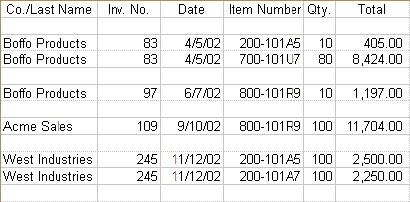
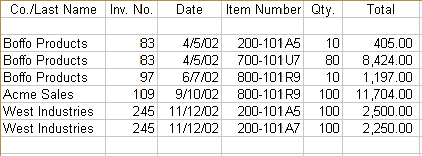
The following illustration shows an import file with no blank lines between the records. In this case, all of the sales will be imported as only one sale.
The following illustration shows the same import file with blank lines inserted between the records. Each sale will be viewed separately and four sales will be imported.