In order to reconcile an account for the first time using AccountEdge, all of the bank statement entries -- including those transactions recorded using your previous accounting method -- must appear in the Reconcile Accounts window of AccountEdge. To "enter" the uncleared transactions that were recorded using your previous accounting method, you'll create a general journal entry that will enable you to reconcile the account using AccountEdge. Here's how:
A line item for each previous accounting method uncleared transaction
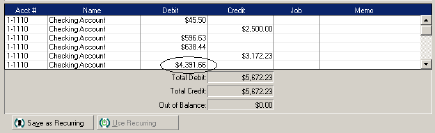
For each entry in the Record Journal Entry window, you'll enter your checking account in the Acct # column. For each individual uncleared deposit amount enter a line item, you'll enter an amount in the Debit column; for each individual uncleared check/withdrawal amount, you'll enter a line item and enter an amount in the Credit column. (The detail of these transactions remains in your previous accounting system.)
Enter a balancing amount line item
When you've finished entering individual deposits and check/withdrawal amounts, it's unlikely that the debits will equal the credits in the Record Journal Entry window. If there is an out of balance amount, you'll need to enter another line item with an amount that balances the debits and credits.
For example, if the Total Debit amount is $1,280.57 and the Total Credit amount is $5,672.23, the out of balance amount is $4,391.66. To balance the general journal transaction, you'll enter an additional line item showing $4,391.66 in the Debit column. The journal entry for this example would look like this:
Your account balance won't change
Because you've entered the same account for each line of the journal entry, your journal entry debits the account and credits the account for the same amount. That is, the general journal entry won't affect the account balance.
Step by step