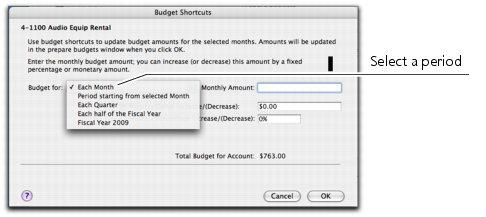
If you want to quickly enter budget figures for a group of months, you can use the
Budget Shortcuts window. You can use this window to enter quarterly, half-yearly and yearly budgets. You can also enter a budget that increases or decreases by a specific amount every month.
If you selected the Each Month option, you can also set a base budget amount for the first month, and the amount or percentage by which this will vary every month onwards.
If the account already has budget figures, a message appears asking if you want to replace the existing budget. Click
OK to replace the budget, or
Cancel if you want to keep the existing amounts (you will be returned to the
Budget Shortcuts window where you may need to click
Cancel again).
If you have not entered any amounts for the budget, a message appears asking if you want to enter zero amounts. Click
OK if you want to do this, or
Cancel if you want to change the amounts.