Lists > Setting up tax codes
Tax codes are used to track tax paid to and by your business. Each tax code represents a particular type of tax, which is used to calculate tax on your transactions.Your software allows you to create an extensive list of tax codes that can be used in a variety of situations—for example, when doing business with overseas customers, when tracking capital acquisitions and so on.When you create a tax code, you need to select which type of tax it is. There are six tax types you can choose from. The table below describes what each tax type is for.
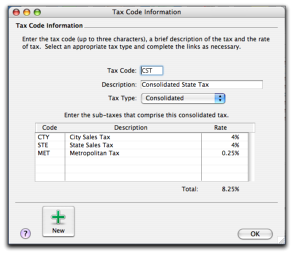
This tax type is used for taxes that are made up of two or more tax codes or sub-taxes. You would use this code if, for example, the 8% tax rate you record on sales is the combined total of a 5% st/province sales tax rate and a 3% goods & services sales tax rate. For more information see below. This tax type should be used by importers bringing goods into your country from other countries. Tax codes with this type are used to record the import duty payable on a purchase without changing the total amount of the purchase. This tax type is associated with the tax recorded on sales and purchases of goods and services. The tax type GST (Goods & Services tax) or VAT (Value Added tax) are associated with the tax recorded on sales and purchases of goods and services. The GST/VAT tax is a tax on the estimated market value added to a product or material at each stage of its manufacture or distribution, ultimately passed on to the consumer. This tax type is indirect tax levied on capital goods, raw materials, spare parts, services etc., which a business consumes or uses in it operations. You can create consolidated tax codes by combining two or more tax codes. For example, the GPT (GST and PST combined to equal an 8.25% tax rate) is composed of GST (Goods and Services Tax) at 5% and PST (Provincial Sales Tax) at 8%.note : You can only consolidate tax codes that are in your tax code listMake sure you first create the tax codes you want to consolidate. The rest of the fields are filled in for you and the consolidated tax rate is calculated automatically.
1
2
3
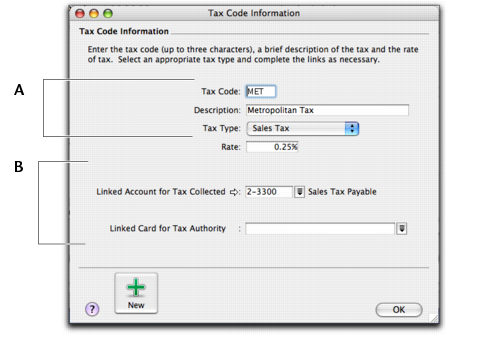
Enter a description, type, and rate. If you selected Consolidated as the Tax Type, see Consolidated tax codes. If the Tax Type is Sales Tax, select the linked account for tax collected. If the Tax Type is Import Duty, select the linked account for accrued duty. Select a card that you want to link to this tax code, if applicable.
5 Click OK when you have finished. The new tax code you created will now appear in your tax codes list.If a tax rate changes or if you wish to link a tax code to a different account, you can change the tax code information.
1 A tax code can only be deleted if it's not in use on a sale, purchase, or cheque, spend money, or receive money transaction.
1
0