New Features > New spell-check feature
Check the spelling in your sales, purchases, and item informationWhen entering sale, purchase or item information, you can now check the spelling in the following fields:
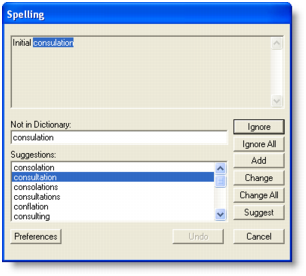
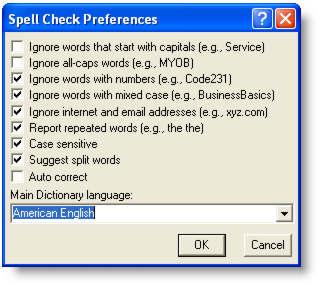
• Description (for Service, Professional, Item, and Miscellaneous layouts) You can choose to set a preference to automatically check spelling or manually check spelling. For more information, see Set spelling preferences.When you choose to automatically check spelling and attempt to record a transaction with a misspelled word, the Spelling window appears.The Spelling window displays the misspelled word and suggests a replacement. You can choose to change the word to the suggested replacement, add it to your dictionary or set the spell-check feature to ignore it.If you want, you can customize your spelling preferences. For example, you can change the main dictionary language and choose a preference to ignore words that include numbers.
1
2 Click the Windows tab.
3 If you want to automatically check spelling select the Automatically Check Spelling in Text Fields Before Recording Transactions option.
4
Ignore words that start with capitals Ignore words with initial capitals, such as proper names, place names, company names, and product names. Ignore all-caps words Ignore words entered in capitals, including acronyms (e.g., IRS, MYOB, PC). Ignore words with numbers Ignore combinations of words (or letters) and numbers (e.g., P35, Code231). Ignore words with mixed case Ignore words with a mixture of upper and lower case letters (e.g., BusinessBasics, iMac). Ignore internet and email addresses Ignore combinations of words, letters, numbers, and characters typical of website and email addresses (e.g., www.myob-us.com, customer.service@myob-us.com). Report repeated words Report instances of two or more repeated words (e.g., the the, itit). Check different cases of the same word (e.g., ‘Service’ and ‘service’ are treated as two separate words). Suggest split words Suggest two replacement words for a single joined word (e.g., ‘it is’ for ‘itis’). Automatically replace common misspellings (e.g., ‘teh’ is replaced with ‘the’). Main dictionary language Set the main dictionary language used by the spell-check feature (e.g., British English, American English).note : Show Me How movieIf you want, you can view a movie demonstrating this feature. Go to the Help menu and choose What’s New in this Release, then New Feature Movies.