Introduction > Learning about your software > Online help
Online help is a comprehensive online resource that complements the user guide by addressing all functions and features of your software, including those used infrequently. It also includes helpful information for solving common bookkeeping problems.
|
■
|

|
■
|
Command+click and choose Help for This Window.
|
|
■
|
Opening online help from any window—other than command centre windows—displays descriptions or procedures relevant to that window. Click Help ( ) and choose Help for This Window, Tell Me How, Tips & Troubleshooting or Search the Help.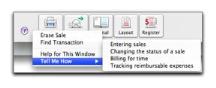
) and choose Help for This Window, Tell Me How, Tips & Troubleshooting or Search the Help.
|
Help for This Window
|
|
||||
|
display a list of topics that tell you how to perform various tasks in the window, or other related tasks.
|
|||||
|
Tips & Troubleshooting
|
display links to topics that give you tips on solving common problems or that direct you to other help sources.
|
||||
The main windows in your software are known as command centres. A help icon ( ) appears in the bottom left corner of each command centre window. For more information, see ‘Command centres’ on page 11.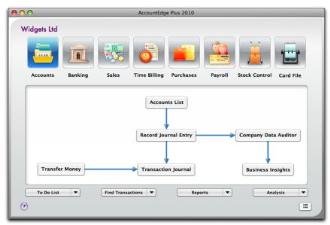
) appears in the bottom left corner of each command centre window. For more information, see ‘Command centres’ on page 11.When you click the help icon, the online help displays a description of the command centre and its various functions.
|
■
|