

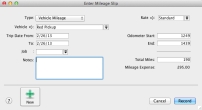
The mileage tracking feature gives you the ability to track mileage for as many vehicles as you want. You can track depreciation for tax purposes for each vehicle and the amount of miles to and from meeting with your customers for expense reimbursement. Keep track of mileage rates using an effective date to help keep up with changes from the government agencies. Also, use your mobile device to sync with AccountEdge Plus and AccountEdge Plus Network Edition to import your mileage logs.
|
1
|
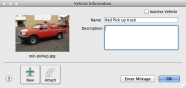
Go to the Lists menu and select Mileage. Select Vehicles from the menu. The Vehicle List window appears.
|
|
2
|
|
3
|
Click OK.
|
|
1
|
Go to the Lists menu and select Mileage. Select Mileage Rates from the menu. The Mileage Rate window appears.
|
|
2
|
|
3
|
|
4
|
Click OK.
|
|
1
|
|
2
|
|
3
|

