

The Migration Assistant feature will help you copy and upgrade your customised Custom Forms, Custom Reports, Graphics, and Letters to your new product and automatically save them to the AccountEdge 2013 product’s support folder.
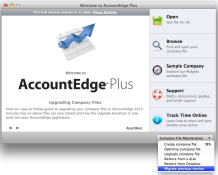
The Migration Assistant is available from the Welcome Window>Company File Maintenance options before you create or open an existing company file.
|
1
|
From the Welcome window, click Company File Maintenance.
|
|
2
|
|
3
|
The previous version application is listed. If this is not the application you want to copy the custom forms from, then click Browse. The Open window will appear.
|
|
4
|
Select the previous version application you want to copy forms from and click Open. The Migration Assistant window reappears.
|
|
5
|
Select Copy Spreadsheets if you have customised Excel spreadsheets in addition to forms, reports and letters in our previous version.
|
|
6
|
Click Start.
|
|
7
|
A message stating migration has completed will appear when the process is complete.
|
|
8
|
Click OK.
|

