
For more information see the Accountedge Knowledge Base article Accountedge Network Edition Information
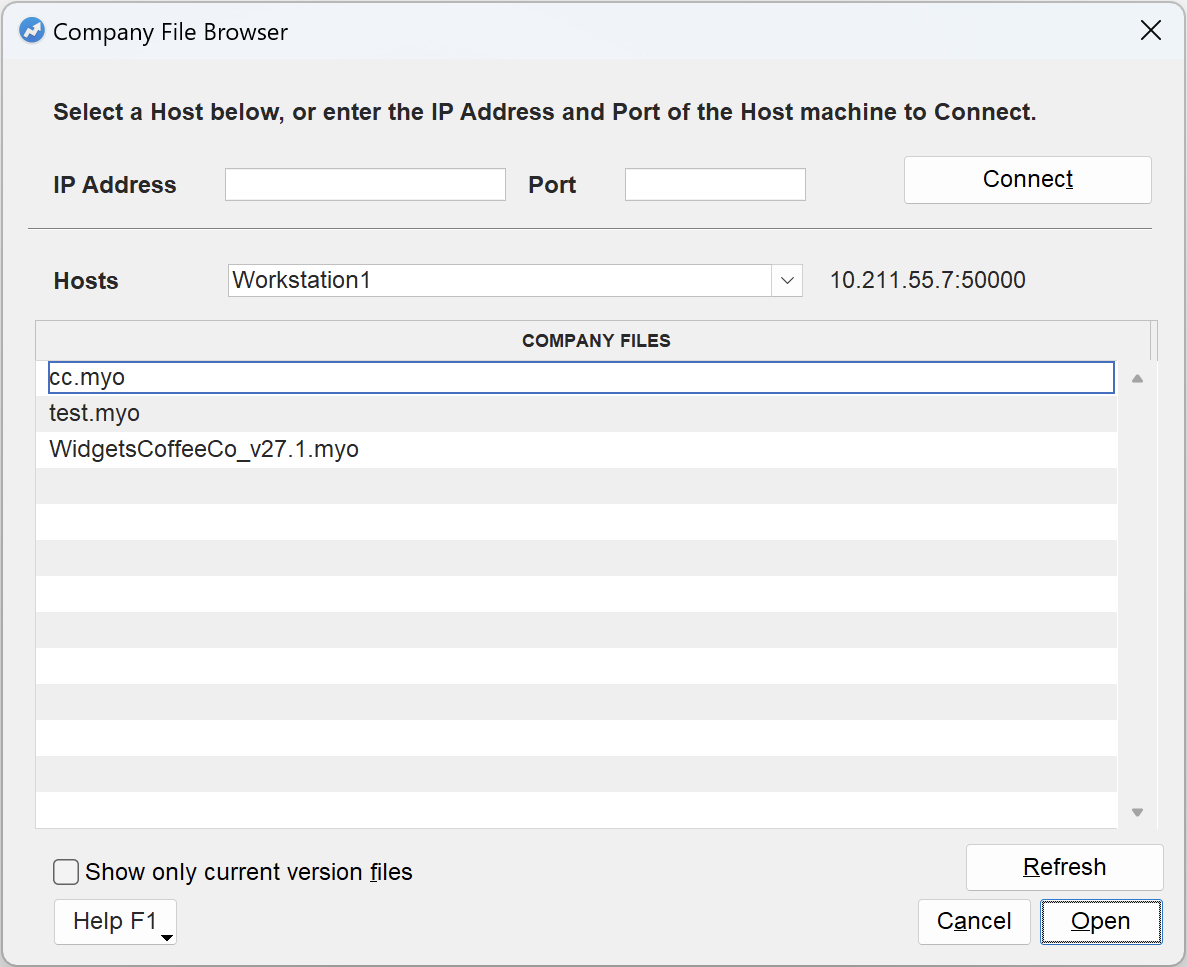 |
|
▪
|
IP Address and Port If the host machine is not in the Hosts popup, enter the IP Address and Port of the machine running AccountEdge FileConnect and select Connect.
|
|
▪
|
Hosts A list of machines on the network running Accountedge FileConnect.
|
|
▪
|
Show only current versions files When selected, only Company Files that match the version of the program will be shown. Older Company File versions will be hidden.
|
|
▪
|
Refesh Update the list of Company Files on the selected host.
|
AccountEdge uses Bonjour, developed by Apple, to discover machines running FileConnect on the network. For this to work, Bonjour needs to be installed on both the client and host machines. When AccountEdge NE and FileConnect were installed, Bonjour should have been installed as well. Double check that Bonjour is installed, and if not, download Bonjour Print Services from Apple's website and install it on both the client and host machines.
If, when starting the server, you see Error registering FileConnect as a Bonjour service -65563 in the scroll area of the FileConnect window, Bonjour may not be installed.
