


Purchases > Entering purchases > Task 4: Enter additional information about the purchase
Task 4: Enter additional information about the purchase
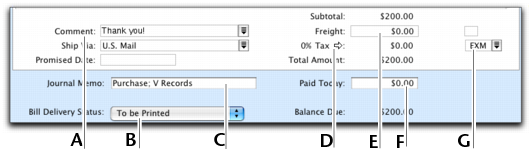
The fields that appear at the bottom of the Purchases window differ, depending on the type of purchase you are creating.
 |
||
|
Enter optional details, such as a comment, shipping method, and the date the goods or services were promised.
|
||
|
Bill Delivery Status
|
If you want to print or email the purchase in a batch, select the required bill delivery method from the list.
|
|
|
The journal memo is generated automatically. You can change it if you want.
|
||
|
If you want to change the tax amount of the purchase, click the zoom arrow (
 ). ). |
||
|
Enter any charges for freight. If the freight charge is taxable, mark the checkbox.
|
||
|
Type an amount here to indicate how much money you paid at the time of the purchase or, if you are creating an order, how much money you gave as a deposit.
|
||

