
The Welcome to AccountEdge Pro window has a new-look with access to more features including easy access to our latest blog entries, sign up for a support plan and get the latest AccountEdge news on our website.
The following are options that are now available to you before you create or open an existing company file: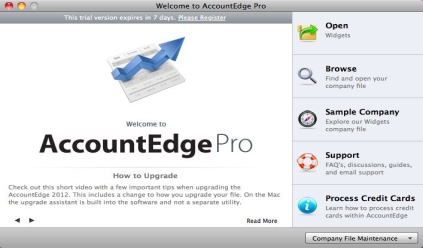
Select Create to create a new company file for your business. After you have created a company file your option will be to Open the company file you just created or the company file you opened last.
|
▪
|
|
▪
|
Select Sample Company to explore the AccountEdge sample company file. This file can help you learn how to use the software.
|
|
▪
|
Select Support for easy access to FAQ’s, discussions with other AccountEdge users, guides, and email support.
 |
|
▪
|
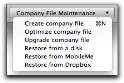
Company File Maintenance drop-down menu to access the following features:
|
|
▪
|
Create company file - select if you want to create additional company files.
|
|
▪
|
Optimize company file - select if you want to optimize your company file before you open it.
|
|
▪
|
Upgrade company file - select when upgrading your company file from FirstEdge or AccountEdge Basic to AccountEdge Pro.
|
|
▪
|
Restore from a disk- select if you want to restore a backup of your company file.
|
|
▪
|
Restore from MobileMe [Mac only]- select if you want to restore a backup of your company file that was previously saved to a MobileMe account.
|
|
▪
|
Restore from DropBox - select if you want to restore a backup of your company file that was previously saved to a Dropbox account.
|

