AccountEdge Pro v14 now has an added option, you can use a hosted service by Shopifiy. Create a web store through Shopify and connect your web store with your AccountEdge company file.
This web store service, hosted by Shopify, is an easy and affordable way to sell your products online. You can take orders online and receive payments then sync with your AccountEdge company file. You can also create discounts and gift cards to apply to your online sales and process the orders in AccountEdge.
|
2
|
|
3
|
|
1
|
|
2
|
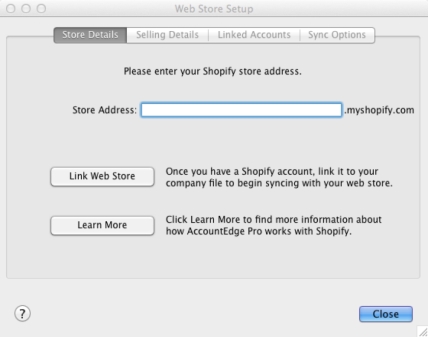
Enter the name of your web store in the Store Address field.
|
|
3
|
note : Enstore customers
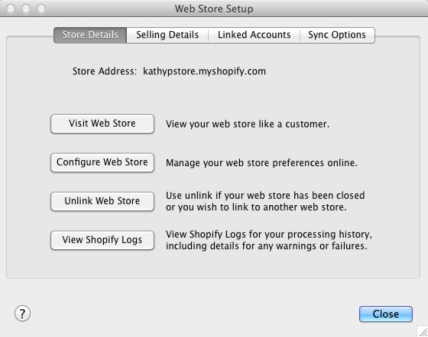
If you already have a web store with Enstore that is currently linked to your company file and you choose to unlink your web store from AccountEdge you will not be able to re-link your web store to AccountEdge.
|
1
|
Go to your Sales command center and click Process Web Orders or click Sales Register and select the All Sales tab then click Process Web Orders. If you have locations selected a Select Required Fields window will appear.
|
|
3
|
The process will begin. If you have web sales to process a window will appear listing number of Orders, new Customers, Payments, Refunds and Cancelleations that were Successfully Processed, Successfully Processed with Warnings and Failed to Process.
|
|
4
|
Click Shopify Log to view details of the process, including details for warnings or failures. The latest Shopify log located in the Documents folder will display.
|
Note: to access this log, go to the Documents folder and click AccountEdge 2014 folder and then click Shopify Logs.
|
5
|
Click OK to close the window.
|
If you have a web store created in Shopify, you can create, sell and redeem gifts cards then export the information into your AccountEdge company file.
If you already have an account with Enstore for your web store, you do not have the option of selling and redeeming gift cards. You can choose to unlink your web store from AccountEdge, however you will not be able to link AccountEdge to your Enstore account again.
|
2
|
Create a sale in your web store for that gift card, when it it purchased or when a customer orders your products, they can apply the gift card to the sale.
|
|
3
|
Process the web order into your AccountEdge company file. When the sale of the git card is imported into AccountEdge, an item for the gift card will be automatically created. The linked accounts for the item will be taken from the Default Linked Accounts assigned when setting up your web store. The amount of the gift card will be posted to a liability (holding) account until the gift card is redeemed. Once it is redeemed, it is applied to an order and shows as a full or parital payment in your company file.
|
If you have a web store created in Shopify, you can create discounts to give to your customers. Your customers can then apply a discount to their order when payment is made in your webstore. When the orders are processed in AccountEdge, the discount will be apllied to each item(s) ordered and will appear on the invoice.