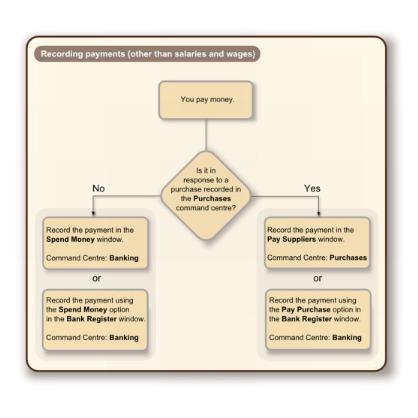
The term spending money refers specifically to recording payments for transactions for which purchases have not been created. These include capital drawings, bank charges, telephone bills and so on. These types of payment can be entered in the
Spend Money window or by selecting the
Spend Money transaction type in the
Bank Register window.
The Spend Money window lets you record more details about the payment and allocate the payment to more than one account. This is the procedure covered in this section. If you want to use the
Bank Register window—which lets you record a payment with minimum details—see
‘To enter a transaction in the Bank Register window’ on page 59.
If you want to make a payment to a supplier for a purchase, you will need to enter the payment using the
Pay Suppliers window or by selecting the
Pay Purchase transaction type in the
Bank Register window. For more information, see
‘Paying suppliers’ on page 108.
Don’t select or deselect the VAT Inclusive option after you enter an amount in the
Amount field.
Before you record this transaction, you can use the recap transaction feature to view the journal entries that will be created when the transaction is recorded. This is useful for confirming that the journal entries are being posted to the correct accounts. To recap, choose
Recap Transaction from the
Edit menu.
If you want to store the payment as a recurring transaction click
Save as Recurring. In the
Edit Recurring Schedule window, enter the necessary information and click
Save. For more information, see
‘Recurring transactions’ on page 222.
After you have recorded a number of payments, say, the day’s payments, you can print or email remittance advices in a batch. For more information, see
‘Sending forms’ on page 243.


).