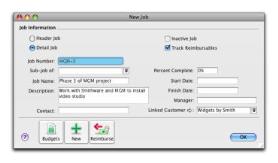
Jobs can be set up to track income and expenses related to specific jobs. This is particularly useful when multiple jobs are performed for a single customer. When you enter a transaction, the appropriate job number can be assigned to each individual amount. This enables you to associate several jobs with the various amounts in a single transaction.
For example, if a purchase includes parts for three customers, you could specify each of the three jobs to which that purchase relates. A profit and loss statement can then be prepared for each job and actual results can be compared with budgeted values by producing a
Jobs Budget Analysis report.
Similarly, sub-jobs allow you to track individual jobs that form part of a larger job. For example, if you are a graphic designer working on a number of print and multimedia deliverables for your client, you could use sub-jobs to track the individual deliverables: website design, business cards production and brochure layout.
You can keep a detailed record of your jobs and sub-jobs. If you intend to use sub-jobs, you will first need to create jobs, to which you can later assign sub-jobs.
If you intend to use sub-jobs, you first need to create header jobs and then assign sub-jobs to them. Note that sub-jobs can be either a detail or header type job.
If you started using your software while a particular job was in progress, you can create the job and then enter any account activity generated by the job so far in the
Job Opening Balances window.
You can enter budgets for detail jobs. The budget information you enter for each job is used to help you assess your progress on a particular job and to determine the job’s effect on the state of your business. The amounts you enter will be recorded against accounts in your accounts list for comparison purposes. Once you begin recording transactions for the job, you will be able to print the
Jobs Budget Analysis report to see a comparison between the actual amounts and the amounts you have budgeted for the job.
All your company’s income, cost of sales, expense, other income and other expense accounts appear in the scrolling list.